Slow office Wi-Fi can disrupt video calls, delay file uploads, and reduce employee productivity. While many businesses blame their internet service provider or wireless router, the real problem may lie in the network cabling hidden behind walls, ceilings, and network racks.
WeFour Connect provides professional structured cabling, fiber optic installation, network troubleshooting, and ongoing maintenance services in Doha, Qatar. Our team helps businesses identify network bottlenecks, repair faulty connections, and build reliable network infrastructure that supports daily operations and future growth.
If you are looking for a practical slow office network fix, understanding how cabling affects network performance is the first step toward finding a lasting solution.
How Does Network Cabling Affect Office Wi-Fi Performance?
Wi-Fi performance depends on more than your router or wireless access points. These devices connect to switches and other network equipment through wired connections. If those connections are damaged, outdated, poorly installed, or overloaded, your wireless network may experience slow speeds, interruptions, and inconsistent performance.
Even a high-speed internet connection cannot deliver its full potential if the internal network has a bottleneck.
Before upgrading your internet plan or replacing your router, check whether your office network cabling is affecting performance.
7 Cabling Problems That Can Slow Down Your Office Network
1. Outdated or Low-Grade Network Cables
Older network cables may not support the speeds required by modern switches, access points, and business applications. For example, older Category 5 cabling may limit performance compared with properly installed Cat 5e or Cat 6 cabling, depending on the equipment and installation conditions.
If your office infrastructure has not been upgraded for years, outdated cabling could be limiting your network speed.
How to fix it: Have your existing cabling tested before replacing it. Upgrade the affected runs to a suitable cable category based on your bandwidth requirements, cable length, and future expansion plans.
2. Poor-Quality Connectors and Patch Cords
A network connection includes more than the cable inside the wall. Patch cords, connectors, wall outlets, and patch panels all contribute to overall performance.
Low-quality components or incompatible terminations can introduce connection errors and prevent links from operating at their intended speeds.
How to fix it: Use compatible, standards-compliant components throughout the cabling system. Inspect patch cords, connectors, and patch panels for wear, damage, or poor workmanship.
3. Improperly Terminated Network Cables
Network cables must be terminated correctly to maintain reliable signal transmission. Loose connections, incorrect wire arrangements, excessive untwisting, or damaged connectors can cause packet errors, intermittent disconnections, and reduced throughput.
These problems can be difficult to identify because the network may work normally at certain times and fail under heavier workloads.
How to fix it: Ask a qualified technician to inspect and re-terminate faulty connections. Cable certification or appropriate network testing can help identify installation faults and verify the repair.
4. Cable Runs That Exceed Recommended Lengths
Standard Ethernet over balanced copper cabling generally supports a channel length of up to 100 metres, including the permanent link and patch cords, subject to the applicable cabling standard.
Longer runs can lead to unreliable connectivity or prevent the equipment from establishing a compliant link. Connections between distant floors, buildings, or network cabinets may need a different design.
How to fix it: Review cable lengths and network layouts. For longer backbone connections, fiber optic cabling is often a better choice because it supports greater distances and high bandwidth.
5. Poor Cable Routing and Physical Damage
Network cables can be damaged by crushing, tight bends, excessive pulling, or poorly managed cable trays. Routing cables too close to sources of electrical interference can also affect performance in susceptible installations.
Poor installation practices may create problems that become noticeable only after equipment upgrades or increased network traffic.
How to fix it: Inspect cable pathways, maintain appropriate separation from electrical wiring in accordance with applicable standards, avoid excessive bending, and replace damaged cables.
6. Unorganized and Unlabeled Cabling
Many offices add new desks, printers, access points, and switches as the business grows. Without a structured plan, the network cabinet can become a confusing collection of unlabeled cables and improvised connections.
This makes troubleshooting slower and increases the risk of accidental disconnections or poorly planned network changes.
How to fix it: Organize the network cabinet, label both ends of every cable, document patch panel connections, and maintain an updated network layout. Structured cabling makes future upgrades and fault diagnosis easier.
7. Overloaded Switches and Slow Network Uplinks
Printers, IP phones, CCTV cameras, computers, wireless access points, and other connected devices all consume network resources.
If too many devices share an undersized switch or a congested uplink, users may experience slow file transfers, buffering, and unreliable connectivity. The issue may become more noticeable as the office adds devices or increases cloud application usage.
How to fix it: Review switch capacity, uplink speeds, traffic patterns, and network configuration. Upgrade congested links or switches where necessary, and consider fiber optic backbone connections between floors or network cabinets.
How to Check Whether Cabling Is Causing Your Slow Office Network
Before investing in new networking equipment, look for these common warning signs:
- Wired computers are also slow: The problem may involve switches, cabling, network configuration, or the internet connection rather than Wi-Fi alone.
- Only one floor or office area is affected: A faulty cable run, access point connection, or switch uplink may be responsible.
- Connections drop randomly: Damaged cables, loose terminations, or failing network equipment could be causing intermittent faults.
- Performance is poor even near the router: Compare a wired speed test with your internet plan and check the internal network path.
- The problem started after adding more devices: Your switch capacity, uplinks, or wireless network may no longer meet demand.
- Nobody knows where cables lead: Missing labels and documentation can make hidden faults harder to locate.
A Simple Office Network Troubleshooting Checklist
- Test internet performance using a wired computer connected to a known-good network port.
- Compare results across different rooms or floors.
- Check the negotiated Ethernet link speed and look for interface errors or dropped connections.
- Test a known-good patch cable and inspect the relevant switch port.
- Review switch utilization, uplink capacity, and wireless access point connectivity.
- Arrange professional cable testing if the problem persists.
Remember that slow Wi-Fi can also result from wireless interference, poor access point placement, outdated equipment, or internet congestion. Testing helps distinguish these issues from cabling faults.
What Does Professional Network Cabling Repair Involve?
A reliable network cabling solution starts with identifying the actual cause of the problem rather than replacing every cable or device unnecessarily.
A professional assessment typically includes the following steps.
1. Network and cabling audit
Technicians inspect network racks, patch panels, cable routes, switches, and access point connections to understand the existing infrastructure.
2. Cable testing and fault identification
Appropriate cable testers or certification equipment help identify wiring faults, damaged runs, and performance limitations. Switch diagnostics can reveal errors and overloaded links.
3. Targeted repairs and upgrades
Depending on the findings, the solution may involve re-terminating connections, replacing damaged patch cords, upgrading selected cable runs, or improving switch capacity.
4. Fiber optic backbone installation
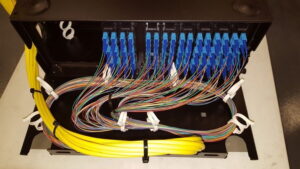
Fiber links can improve backbone capacity between floors, server rooms, and buildings where distance or bandwidth requirements exceed the practical capabilities of copper connections.
5. Cable organization and labeling
Properly labeled outlets, patch panels, and network racks make ongoing maintenance and future expansion more efficient.
6. Final testing and documentation
After repairs, technicians verify the relevant connections and document the installation, test results, and network layout.
This approach helps businesses resolve performance issues while avoiding unnecessary replacement costs.
Structured Cabling vs. Ad-Hoc Network Wiring
Structured cabling is a planned, standards-based infrastructure designed to support network services throughout a building. It typically includes organized cable runs, patch panels, labeled outlets, and documented connections.
Ad-hoc wiring develops when cables and network devices are added without a consistent design or documentation.
| Feature | Structured cabling | Ad-hoc wiring |
| Organization | Planned and labeled | Often inconsistent |
| Troubleshooting | Easier to trace faults | Can be time-consuming |
| Expansion | Designed for future growth | May require frequent rework |
| Maintenance | More systematic | Often reactive |
| Long-term management | Easier to document | More difficult to manage |
For growing businesses, structured cabling can improve maintainability, simplify troubleshooting, and provide a stronger foundation for future network upgrades.
When Should Your Office Consider Fiber Optic Cabling?
Copper Ethernet cabling remains suitable for many office desk connections. Fiber optic cabling is particularly useful when businesses need greater backbone capacity or longer-distance connections.
Consider fiber when you need to:
- Connect multiple floors or separate buildings.
- Link server rooms, network cabinets, or data rooms.
- Support high traffic from wireless access points, cameras, and many connected devices.
- Increase backbone capacity for future network expansion.
- Reduce susceptibility to electromagnetic interference along the fiber link.
The right solution depends on distance, bandwidth requirements, equipment compatibility, and budget. Fiber is not automatically necessary for every office, but a well-designed fiber backbone can remove important network bottlenecks.
7 Tips to Keep Your Office Network Fast and Reliable
Follow these network maintenance practices to reduce avoidable performance problems:
- Label network cables, outlets, and switch ports.
- Keep cabling organized and protect it from physical damage.
- Use compatible, standards-compliant cables and components.
- Test network connections when adding new equipment.
- Plan for additional bandwidth and ports as the business grows.
- Maintain updated network diagrams and equipment records.
- Schedule periodic inspections and investigate recurring connection issues promptly.
Regular maintenance can help identify small faults before they disrupt business operations.
How WeFour Connect Can Help Improve Your Office Network in Doha
If your office Wi-Fi is slow, WeFour Connect can help investigate whether cabling, switches, fiber links, or other network infrastructure issues are contributing to the problem.
We provide network infrastructure services for businesses in Doha, Qatar, including:
- Structured cabling: Organized network cabling designed for reliable data, voice, and connectivity requirements.
- Fiber optic installation and splicing: Backbone connectivity for floors, buildings, network cabinets, and server rooms.
- Customized network solutions: Infrastructure planned around your premises, number of users, equipment, and future growth.
- Warranty and Annual Maintenance Contracts (AMC): Maintenance options and support to help keep network infrastructure in good condition.
- 24/7 support for critical issues: Assistance for urgent network infrastructure problems, subject to the applicable service arrangements.
The project timeline depends on the size of the office, accessibility of cable routes, testing requirements, and scope of work. Smaller jobs may take a few hours, while larger installations can require several days or longer.
Contact WeFour Connect to discuss your office network requirements and arrange an assessment.
WeFour Connect — Doha, Qatar
- Address: Office No. 5, Bank Street, West Bay, Doha, Qatar
- Phone: +974 3146 4818 | +974 3146 4718